
Restore purchases asks the App Store to sync your purchases to this device and then re-checks which subscriptions are active. Use it when you subscribed with the Apple payment option and this device does not seem to recognize your plan.
Restore your subscription
- Open the sidebar, tap your name at the bottom, then choose Settings.
- In the Account group, tap Restore purchases.
- Wait while a spinner replaces the icon. The row stays disabled until the check finishes.
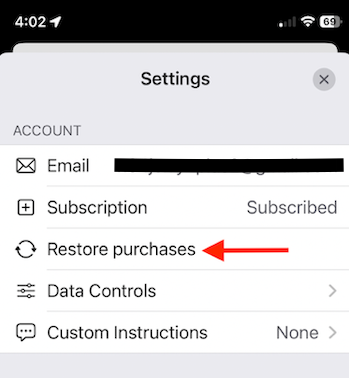
ZeroTwo does not show a confirmation or an error message after a restore. If the check finds an active Pro, Ultra or Business subscription, the app raises your plan level on this device; for example, the "Do more with ZeroTwo Pro" card disappears from the sidebar. The plan name beside Usage and Subscription in Settings is read from your ZeroTwo account, so Restore purchases does not change it.
If your plan still shows as Free
- Check the App Store account on the device. Restore looks at the subscriptions on the App Store account signed in on this device, so use a device signed in with the Apple account that bought the plan.
- Check which ZeroTwo account you are in. An Apple subscription can belong to only one ZeroTwo account. See Why is my Apple subscription linked to another ZeroTwo account?
- Remember that Restore covers Apple purchases only. A plan you bought with the Card option is saved on your ZeroTwo account, so signing in with that account is enough. See Can I use my ZeroTwo plan on another device?
Automatic checks
You do not have to restore every time. When the app starts, ZeroTwo also checks your App Store subscription as a backstop to the plan stored on your account.
To cancel or manage a plan billed by Apple, read How do I cancel my ZeroTwo subscription? For a receipt for that plan, read How do I get an invoice or receipt for a ZeroTwo plan I bought through the App Store?